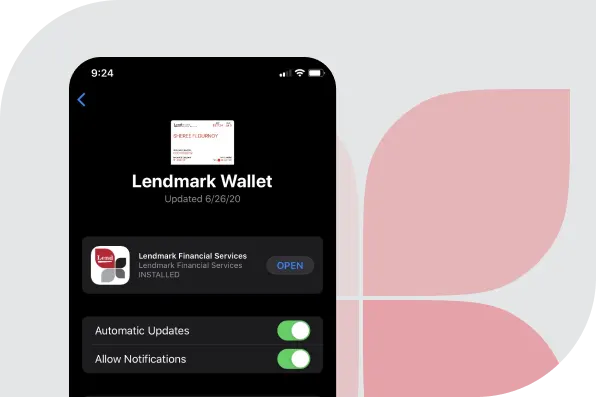
Pay your bill with One Safe Click
Enroll in Lendmark Wallet to receive and pay your monthly bill through your smartphone’s mobile wallet - Apple Wallet (iPhone) or Google Wallet (Android).
Signing up is easy. There’s no app to download. Simply tap one of the buttons below to add Lendmark to your Apple or Google wallet. You will be asked to enter your account number, zip code and last 4 of your social security number to add your billing pass to your mobile wallet of choice.
No username or password. All you need to do is unlock your phone to access your wallet. No need to remember a special username or password.
Never miss a bill. Receive real-time notifications such as when a new bill is available or when your bill is due.
Seamlessly view and pay. On the back of the pass you will see additional options, such as view your recent transaction history or make a payment.
New NO FEE Cash Payment Option: Now you can pay your loan with cash, where you shop. Just take the cash code on the pass to a participating retailer, let them scan the code, and pay with cash! This option is available in 85,000+ participating stores nationwide. Click here (opens in new tab) for a list of participating retailers.
Get started now! Simply sign up by clicking on the appropriate mobile wallet button associated with your smartphone.
VanillaDirect Pay is provided by InComm Financial Services California, Inc. and by InComm Financial Services, Inc. (NMLS# 912772), which is licensed as a Money Transmitter by the New York State Department of Financial Services. Terms and conditions apply
Frequently Asked Questions about Lendmark Wallet
Whether you’re setting up your digital pass for the first time, looking for quick tips on managing your notifications, or trying to find a convenient cash payment location, we’ve got you covered. Explore the topics below to get the most out of your wallet.
Getting Started & Enrollment
What is a mobile wallet?
Your mobile wallet is an app that comes pre-installed on every smartphone. It is the digital equivalent of a physical wallet where you can store, organize and access payment and non-payment items. It keeps digital versions of credit cards, loyalty cards, coupons, stored value cards, membership cards, tickets and more all in one place. Now it can store your bill as well.
How do I sign up?
Sign up by tapping the “Add to Wallet” or “Save to Phone” button from your mobile device. When the mobile pass displays, tap “Add” to add the pass to your mobile wallet. You can then open your wallet to see your bill.
Is there a charge for Lendmark Wallet?
No, enrolling in Lendmark Wallet is free of charge. There are multiple payment options within the wallet that may have an associated fee.
Please note that a $2.20 fee may be charged and collected directly by the third-party payment processor, ACI worldwide, for the debit card payment option.
If I just got a new loan, how soon after can I enroll my Lendmark Wallet Pass?
The next business day.
What If I have more than one account with Lendmark? Do I need multiple Lendmark Wallet passes?
Yes, each pass is unique to an individual account. If you have multiple accounts, and want Lendmark Wallet for each, you will need to enroll each account separately.
Who do I contact if I'm having trouble enrolling my Lendmark Wallet pass?
Please call our dedicated customer service team at (833) 239-3537.
Using & Managing the Wallet
How do I use the mobile wallet?
By choosing this option, your bill will be delivered every month into your smartphone’s mobile wallet through your Apple Wallet (iOS devices) or Google Pay (Android devices). From there, you can view your bill and click on a link to quickly pay your bill.
How do I see the back of the pass to make a payment?
Click on the white circle with three dots (ellipsis) in the top right-hand corner on the front of the pass.
Will I receive notifications?
Yes, you will receive notifications reminding you when a payment is coming up, when a payment is due, or potentially, when a payment is past due. For iOS devices, your notifications will pop up on your phone regardless of whether you are in your mobile wallet app or not. For Android devices, notifications will be posted in your wallet, but will not pop up on your phone. You will need to access your wallet to see them.
How do I manage my notification preferences?
From the back of your pass you can manage each of your notifications and choose specifically which ones you would like to receive.
Will I still receive paper statements?
Yes. If you would like to start receiving electronic statements instead of paper statements you can do so automatically by registering for our mobile app, Lendmark Mobile. Click here to learn more.
If I no longer want Lendmark Wallet how can I remove it?
Simply by clicking "Remove Pass" on the back of the pass.
What are the customer support hours?
M-F 8:30AM-8:30PM EST
Cash Payments
How does the cash payment option work?
New NO FEE Cash Payment Option: Now you can pay your loan with cash, where you shop. Just take the cash code on the pass to a participating retailer, let them scan the code, and pay with cash! This option is available in 85,000+ participating stores nationwide. Click here (opens in new tab) for a list of participating retailers.
Where do I find the VanillaDirect Pay barcode to make a cash payment?
The VanillaDirect Pay barcode can be found in your Lendmark wallet.
Where can I make a cash payment using the VanillaDirect Pay barcode?
Participating retailers can be found here (opens in new tab).